CSS Stacking Context Pitfalls and Role Management with Cognito Groups

Today I debugged two separate things. One was a CSS stacking context issue. The other was around AWS authentication infrastructure. Both end with "oh, of course" once you know the cause — but getting there is draining.
CSS Stacking Context
Symptoms
On mobile, pressing the hamburger menu moves the header but the menu content doesn't appear at all. Or the page shifts sideways and freezes.
The UI is generated by a framework, but it's broken — and the cause is some other CSS I wrote myself. Classic.
Pitfall 1: putting overflow-x: hidden on the root element
A line commonly written to prevent horizontal scrolling:
html, body {
  overflow-x: hidden;
}
It looks harmless, but applying overflow-x: hidden to html changes the reference frame for position: fixed — a side effect worth knowing.
Normally, position: fixed elements are positioned relative to the browser viewport. But when overflow-x: hidden is applied to the html element, the html element itself becomes the containing block instead of the viewport. Sidebars, modals, and other fixed UI elements stop appearing where expected.
How to fix it
Remove it from html. If horizontal scrolling is appearing, find the element causing the overflow and fix it at the source — that's the real solution.
/* ❌ overflow-x: hidden on html has side effects */
html { overflow-x: hidden; }

/* ✅ limit to body only if really needed (still has side effects) */
/* Better to fix the overflowing element directly */
Pitfall 2: backdrop-filter creates a stacking context
Adding a frosted glass effect to the navbar can break UI inside it.
.navbar {
  backdrop-filter: blur(12px);
}
The cause is the stacking context.
A stacking context is a group that determines CSS layering order (z-index). Elements with backdrop-filter create a new stacking context. This means their children can only compete for stacking order within the group — they can't break out into the page at large.
Docusaurus's mobile sidebar lives as a child of the navbar. When the navbar creates a stacking context via backdrop-filter, the sidebar is trapped inside the navbar's "box" and can't expand to fill the screen.
How to fix it
Move the backdrop-filter to a ::before pseudo-element instead. This way the navbar itself doesn't create a stacking context, and its children can stack freely.
/* ❌ backdrop-filter on .navbar → children get trapped */
.navbar {
  backdrop-filter: blur(12px);
  background: rgba(0, 0, 0, 0.8);
}

/* ✅ move it to ::before → .navbar doesn't create a stacking context */
.navbar {
  background: transparent;
}

.navbar::before {
  content: '';
  position: absolute;
  inset: 0;
  backdrop-filter: blur(12px);
  background: rgba(0, 0, 0, 0.8);
  z-index: -1;
}
Useful to know: CSS properties that create stacking contexts
A list of properties that tend to be the culprit when "UI is mysteriously broken":
| Property | Condition |
|---|---|
opacity | When less than 1 |
transform | When not none |
filter | When not none |
backdrop-filter | When not none |
position | When z-index is not auto |
will-change | When specifying the above |
When a modal, dropdown, or slide-in menu isn't showing or has wrong layering, checking the parent elements for these properties usually leads to the answer.
Managing Roles with Cognito Groups
Background
For a certain service, I want to show different UI based on role. Regular users see the service screen; admin-role users see the management screen.
It's a serverless setup so I don't want a backend. Authentication uses AWS Cognito.
Evaluating the options
| Approach | Overview | Issue |
|---|---|---|
| Custom attribute | Store custom:role in the user attribute | Risk that users can modify it themselves |
| Cognito Groups | Assign to group, auto-reflected in JWT | Only admins can change it, no server needed |
| External DB | Manage roles in DynamoDB or similar | Requires a backend |
I went with Cognito Groups.
The mechanism is simple
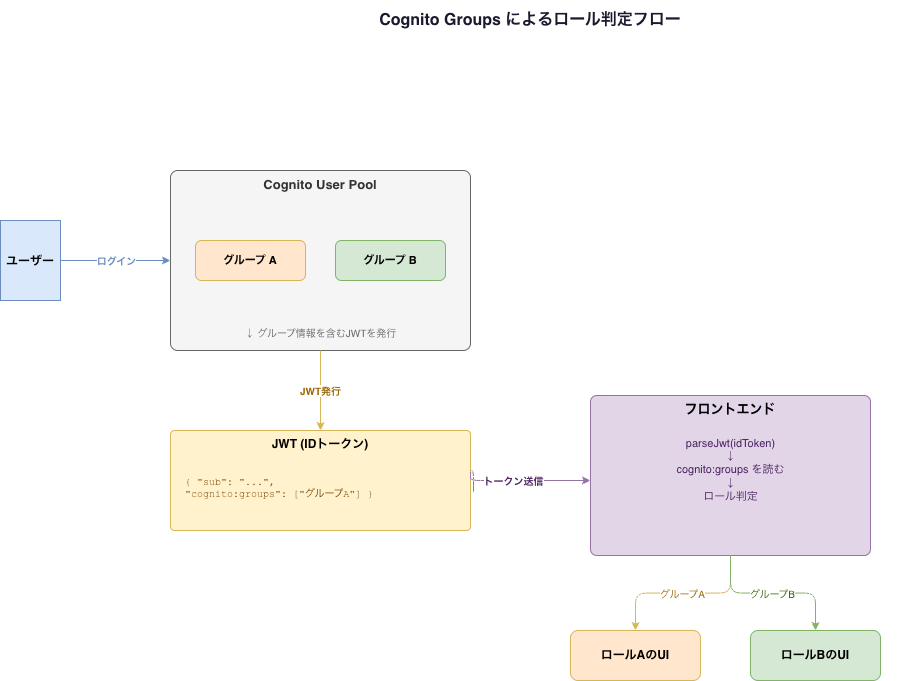
Create a group in Cognito and assign users to it — the user's ID token (JWT) automatically gets a cognito:groups claim.
{
  "sub": "xxxx",
  "email": "[email protected]",
  "cognito:groups": ["admins"]
}
The frontend reads this to determine the role:
const payload = parseJwt(idToken)
const groups: string[] = payload['cognito:groups'] ?? []
const role = groups.includes('admins') ? 'admin' : 'user'
Since only admins can add or remove users from groups, it's safer than custom attributes.
Important caveat
JWT payloads are only Base64-encoded — anyone can read them. Frontend role checking should be limited to UI display logic only.
Frontend: show/hide UI based on role (display control)
Backend: validate JWT and control API access (authorization)
Access control for important APIs must always be enforced on the backend (API Gateway authorizer, Lambda). Relying on the frontend alone for authorization means a tampered JWT could bypass it.
Reflections
For CSS pitfalls, knowing why something breaks lets you fix it dramatically faster. The stacking context concept doesn't click immediately, but thinking of it as "groups that compete for layering order" makes it clearer.
Cognito Groups was simple and easy to work with. If roles get more complex or permissions multiply, combining with DynamoDB would make sense — but for this phase, this is enough.
Live with a Smile!